Notice: Function _load_textdomain_just_in_time was called incorrectly. Translation loading for the cf-geoplugin domain was triggered too early. This is usually an indicator for some code in the plugin or theme running too early. Translations should be loaded at the init action or later. Please see Debugging in WordPress for more information. (This message was added in version 6.7.0.) in /home/u272573935/domains/wiki.otelms.co/public_html/wp-includes/functions.php on line 6131

Deprecated: Function Redux::setHelpTab is deprecated since version Redux 4.3! Use Redux::set_help_tab( $opt_name, $tab ) instead. in /home/u272573935/domains/wiki.otelms.co/public_html/wp-includes/functions.php on line 6131

Deprecated: Function Redux::setHelpSidebar is deprecated since version Redux 4.3! Use Redux::set_help_sidebar( $opt_name, $content ) instead. in /home/u272573935/domains/wiki.otelms.co/public_html/wp-includes/functions.php on line 6131

Deprecated: Creation of dynamic property Vc_Automapper::$title is deprecated in /home/u272573935/domains/wiki.otelms.co/public_html/wp-content/plugins/js_composer/include/classes/settings/class-vc-automapper.php on line 192

Deprecated: Function WP_Dependencies->add_data() was called with an argument that is deprecated since version 6.9.0! IE conditional comments are ignored by all supported browsers. in /home/u272573935/domains/wiki.otelms.co/public_html/wp-includes/functions.php on line 6131

Deprecated: Function WP_Dependencies->add_data() was called with an argument that is deprecated since version 6.9.0! IE conditional comments are ignored by all supported browsers. in /home/u272573935/domains/wiki.otelms.co/public_html/wp-includes/functions.php on line 6131
Guest check-out - Knowledge Base of the OtelMS Site

Work with orders

Guest check-out

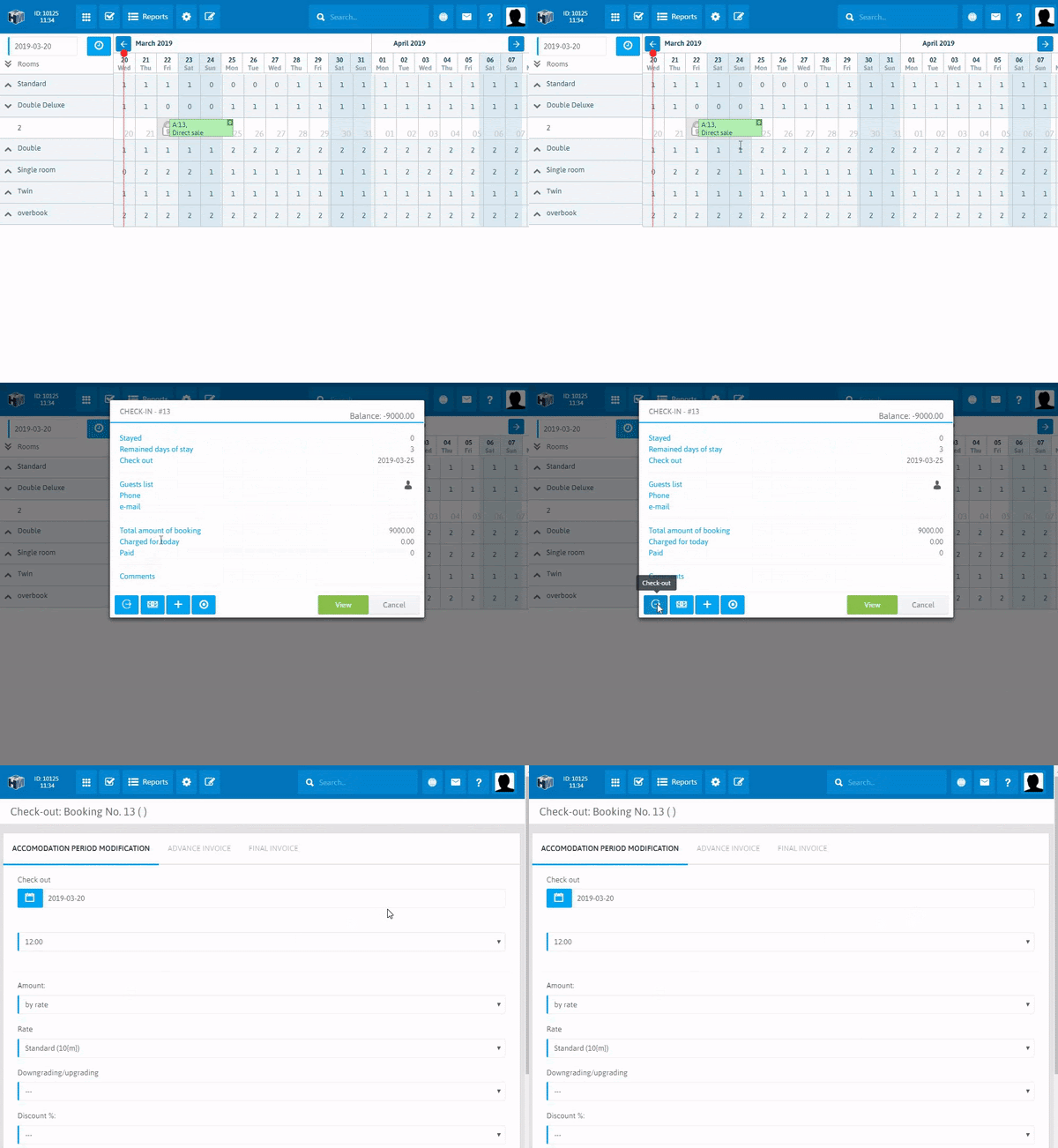
The check-out procedure implies a change in the status of the order from “Check-in” to “Check-out”.

In order to change the accommodation status to check-out, you should click the mouse on the reservation with the status “Check-in” and click on the “Check-out” button Guest check-out

The check-out procedure consists of three main steps, displayed as tabs:

  1. ACCOMMODATION PERIOD MODIFICATION
  2. ADVANCE INVOICE
  3. FINAL INVOICE

Guest check-out

1 STEP

Menu – “Accommodation period modification” allows you to make changes to this reservation during check-out, here you can change those details that may have changed during the stay (for example, if the guest leaves earlier than he planned). You can change the range of dates of stay, the size of the discount, the rate and, if necessary, set the amount of the fine.

When changing the range of dates of stay, the balance of the reservation will be automatically changed to a higher or lower side.

2 STEP

The “Advance invoice” menu allows you to bring the balance of the reservation to the total amount by adding the necessary payments and services to the booking.

Guest check-out

3 STEP

Menu “Final invoice” – to clarify the final balance of the reservation before the check-out and also print out the invoice to the guest.

Guest check-out

After all financial details are clarified, you can click on the button Guest check-out

After clicking on the button, the order remains on the Front desk and changes its color.

The color scheme of orders for the Front desk can be changed

Settings Visual design Color scheme

Booking information remains in the history of bookings and in reports. In the future, it is also possible to search and view booking data with the “Check-out” status.


Related Articles