Notice: Function _load_textdomain_just_in_time was called incorrectly. Translation loading for the cf-geoplugin domain was triggered too early. This is usually an indicator for some code in the plugin or theme running too early. Translations should be loaded at the init action or later. Please see Debugging in WordPress for more information. (This message was added in version 6.7.0.) in /home/u272573935/domains/wiki.otelms.co/public_html/wp-includes/functions.php on line 6131

Deprecated: Function Redux::setHelpTab is deprecated since version Redux 4.3! Use Redux::set_help_tab( $opt_name, $tab ) instead. in /home/u272573935/domains/wiki.otelms.co/public_html/wp-includes/functions.php on line 6131

Deprecated: Function Redux::setHelpSidebar is deprecated since version Redux 4.3! Use Redux::set_help_sidebar( $opt_name, $content ) instead. in /home/u272573935/domains/wiki.otelms.co/public_html/wp-includes/functions.php on line 6131

Deprecated: Creation of dynamic property Vc_Automapper::$title is deprecated in /home/u272573935/domains/wiki.otelms.co/public_html/wp-content/plugins/js_composer/include/classes/settings/class-vc-automapper.php on line 192

Deprecated: Function WP_Dependencies->add_data() was called with an argument that is deprecated since version 6.9.0! IE conditional comments are ignored by all supported browsers. in /home/u272573935/domains/wiki.otelms.co/public_html/wp-includes/functions.php on line 6131

Deprecated: Function WP_Dependencies->add_data() was called with an argument that is deprecated since version 6.9.0! IE conditional comments are ignored by all supported browsers. in /home/u272573935/domains/wiki.otelms.co/public_html/wp-includes/functions.php on line 6131
Payment methods - Knowledge Base of the OtelMS Site

General settings

Payment methods

Displays payment methods that are available when payments are fixed in reservations, which allows you to subsequently generate statements of cash flow, depending on the method of payment.

The basic setting is 4 types of payment, if necessary, you can edit them, delete them or add new ones.

To fix the payment, you must have at least one type of payment.
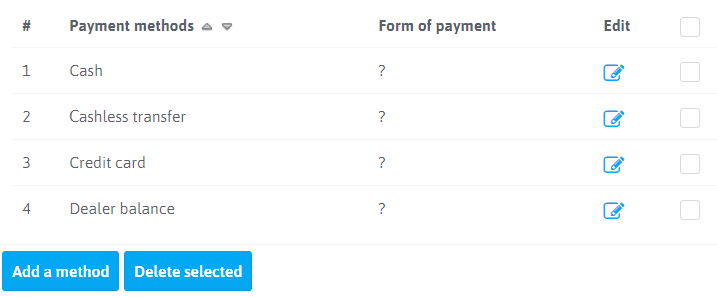
 

Payment methods


To adjust the payment method in the column “Action” click on Payment methods

Payment methods

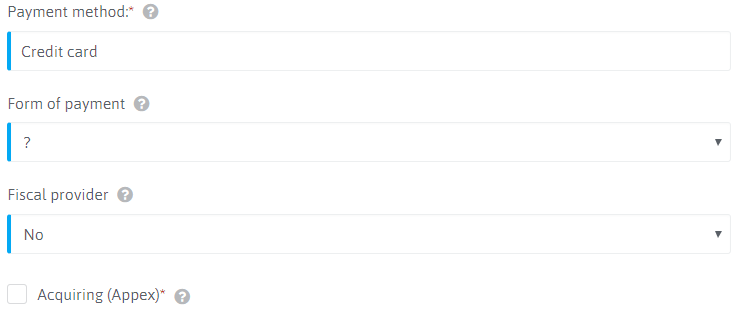
  • Payment method*: Name of the payment type (displayed in the reservation)
  • Form of payment: Not required
  • Fiscal provider: Setup for CR (at connection of a cash register)
  • Acquiring (Appex)*: Setup for CR (at connection of a cash register)
Related Articles