Notice: Function _load_textdomain_just_in_time was called incorrectly. Translation loading for the cf-geoplugin domain was triggered too early. This is usually an indicator for some code in the plugin or theme running too early. Translations should be loaded at the init action or later. Please see Debugging in WordPress for more information. (This message was added in version 6.7.0.) in /home/u272573935/domains/wiki.otelms.co/public_html/wp-includes/functions.php on line 6131

Deprecated: Function Redux::setHelpTab is deprecated since version Redux 4.3! Use Redux::set_help_tab( $opt_name, $tab ) instead. in /home/u272573935/domains/wiki.otelms.co/public_html/wp-includes/functions.php on line 6131

Deprecated: Function Redux::setHelpSidebar is deprecated since version Redux 4.3! Use Redux::set_help_sidebar( $opt_name, $content ) instead. in /home/u272573935/domains/wiki.otelms.co/public_html/wp-includes/functions.php on line 6131

Deprecated: Creation of dynamic property Vc_Automapper::$title is deprecated in /home/u272573935/domains/wiki.otelms.co/public_html/wp-content/plugins/js_composer/include/classes/settings/class-vc-automapper.php on line 192

Deprecated: Function WP_Dependencies->add_data() was called with an argument that is deprecated since version 6.9.0! IE conditional comments are ignored by all supported browsers. in /home/u272573935/domains/wiki.otelms.co/public_html/wp-includes/functions.php on line 6131

Deprecated: Function WP_Dependencies->add_data() was called with an argument that is deprecated since version 6.9.0! IE conditional comments are ignored by all supported browsers. in /home/u272573935/domains/wiki.otelms.co/public_html/wp-includes/functions.php on line 6131
Seasons - Knowledge Base of the OtelMS Site

Rate management

Seasons

The seasons that are created in the system are displayed.

Demand period – the time range during which the actual cost of living is relevant.

If there is no difference in cost by period, the date range must be created for 2 years ahead.

Pricing is carried out in the rate settings.

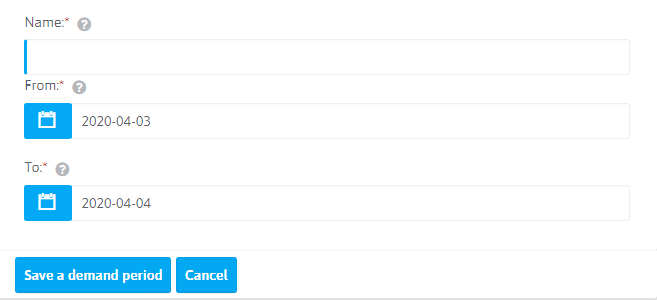
To create a new demand period, click the button Seasons
Seasons


  • Name:* Symbol of the name of the demand period
  • From:* Specify the start date of the season period
  • To:* Specify the end date of the season period

Click on Seasons

Existing demand periods can be edited, deleted.

IMPORTANT! Changing the period of the season (extension, reduction, change of dates of action) are not automatically uploaded to the booking channels. It is necessary to do the additional unloading.


Related Articles