Notice: Function _load_textdomain_just_in_time was called incorrectly. Translation loading for the cf-geoplugin domain was triggered too early. This is usually an indicator for some code in the plugin or theme running too early. Translations should be loaded at the init action or later. Please see Debugging in WordPress for more information. (This message was added in version 6.7.0.) in /home/u272573935/domains/wiki.otelms.co/public_html/wp-includes/functions.php on line 6131

Deprecated: Function Redux::setHelpTab is deprecated since version Redux 4.3! Use Redux::set_help_tab( $opt_name, $tab ) instead. in /home/u272573935/domains/wiki.otelms.co/public_html/wp-includes/functions.php on line 6131

Deprecated: Function Redux::setHelpSidebar is deprecated since version Redux 4.3! Use Redux::set_help_sidebar( $opt_name, $content ) instead. in /home/u272573935/domains/wiki.otelms.co/public_html/wp-includes/functions.php on line 6131

Deprecated: Creation of dynamic property Vc_Automapper::$title is deprecated in /home/u272573935/domains/wiki.otelms.co/public_html/wp-content/plugins/js_composer/include/classes/settings/class-vc-automapper.php on line 192

Deprecated: Function WP_Dependencies->add_data() was called with an argument that is deprecated since version 6.9.0! IE conditional comments are ignored by all supported browsers. in /home/u272573935/domains/wiki.otelms.co/public_html/wp-includes/functions.php on line 6131

Deprecated: Function WP_Dependencies->add_data() was called with an argument that is deprecated since version 6.9.0! IE conditional comments are ignored by all supported browsers. in /home/u272573935/domains/wiki.otelms.co/public_html/wp-includes/functions.php on line 6131
Services - Knowledge Base of the OtelMS Site

Rate management

Services

Services provided to guests for an additional fee or without it.

The range of services provided is added by the user arbitrarily.

IMPORTANT! You can only delete a service if it is not added to reservations.

If the service is no longer provided at the accommodation facility, it can be made inactive.

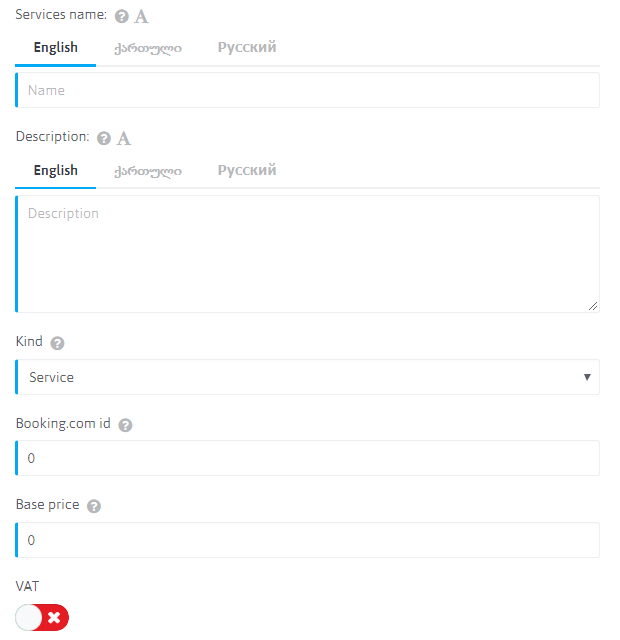
To add additional services you need to click Services

Services

  • Services name: Indicate the name of the service. It is displayed in orders and on the booking engine. If several languages are activated in the language settings, then you need to go to the tab with the name of the language, click on the letter “A”, the system will automatically translate the text into another language.
  • Description: Not applicable
  • Kind: Выбрать тип услуги из предложенного списка.
  • Booking.com ID: Synchronization of the service with Booking.com. In order to receive the current service upon receipt of the order. Contact Help to clarify service IDs.
  • Base price: Specify the base price of the service per unit
  • VAT: Not applicable

Services

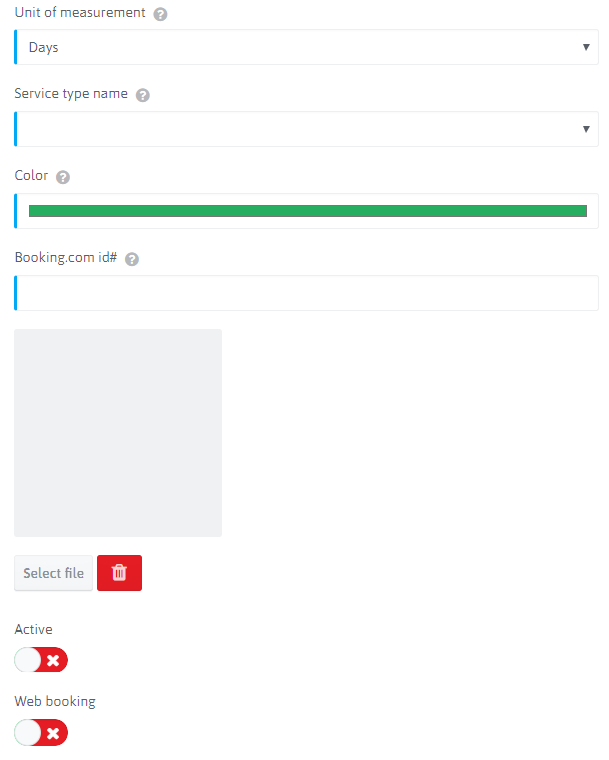
  • Unit of measurement: Select a service unit from the list
  • Service type name: Select the type of service from the list. You can add service types in the previous section.
  • Color: Not applicable
  • Booking.com ID#: Synchronization services with Booking.com. In order to receive the current service upon receipt of the order. Contact Help to clarify service IDs.
  • Active: Relevance of the service in the system.
  • Web booking: Available when booking through booking engine.

Generates a report on the services provided or scheduled.

Artículos similares (artículos relacionados)